2026-06-09
Why RAG Exists
Even a powerful LLM answers confidently and wrong about your own documents and yesterday's events. Part 1 of a from-scratch series on Retrieval-Augmented Generation: no code, just the four problems RAG solves and one durable mental model.
What you’ll learn
By the end of this part you’ll understand, in plain language, why a large language model, however impressive, gets confident and wrong about your own documents and about anything recent, and how RAG (Retrieval-Augmented Generation) fixes that by handing the model the right information at the moment it answers. We’ll stay conceptual here: no code, just the four problems RAG solves, one durable mental model (the open-book exam), and a bird’s-eye map of the whole pipeline you’ll spend the rest of the series building.
A word on scope: this series covers RAG end to end, from embeddings and chunking through retrieval, re-ranking, and evaluation, but it is not a general LLM course, so we won’t teach you to train or fine-tune a base model, and we’ll keep prompt engineering to only what retrieval needs. And if you’ve ever watched a chatbot search the web and answer from what it found, you’ve already used a flavor of RAG: it sits alongside tool-use, agents, and web-search as one specific pattern (retrieve-then-generate over your data), and web-search-augmented chat is just retrieval you’ve already used, pointed at the open internet instead of your documents.
Prerequisites
None. This is Part 1. If you can read a sentence of Python you’re already over-qualified for today; the code starts in later parts.
The confidently wrong answer
Here’s a moment you may have lived through.
You’ve got a genuinely capable model in front of you: the kind that writes working code, explains calculus, and drafts your emails. So you ask it something that matters to your world:
“What’s our company’s refund window for orders placed in 2026?”
It answers instantly, in fluent, self-assured prose: “Refunds are accepted within 90 days of purchase.” Clean. Confident. Done.
Except your refund window is 30 days. It always has been. The number 90 appears nowhere in your handbook. The model didn’t read your handbook (it has never seen it), so it did the only thing it knows how to do: it produced text that sounds like a refund policy. And a plausible-sounding refund policy contains a number, so it supplied one.
Now try a different question:
“Summarize what happened in the incident our team filed yesterday.”
Same fluency, same confidence, same problem, but this time there isn’t even a wrong page to point to. Yesterday hadn’t happened yet when this model was built. It cannot know.
Neither of these is a bug you can prompt your way out of, and neither means the model is “dumb.” They’re structural. A language model, on its own, is a brilliant reasoner with no access to your information and no clock. Before we can fix that, we have to be precise about why it happens, because each cause maps to a thing RAG does.
Why a vanilla LLM gets it wrong: four limitations
Let me define the thing we’re critiquing first. A large language model (LLM) is a model trained on an enormous pile of text to do one deceptively simple task: given some text, predict the next chunk of text. That’s it. Everything it appears to “know” is a side effect of having gotten very, very good at that prediction game across a huge fraction of the internet.
That single design choice produces four limitations. They’re not random flaws; they fall out directly from “predict the next piece of text.”
1. Hallucination
A hallucination is when the model states something false with the same confidence it states something true. Not a typo, not a hedge: a fabricated fact delivered in a steady voice.
Why does it happen? Because the model was never trained to track truth. It was trained to produce likely text. When you ask for our refund window, the model isn’t consulting a fact and reporting it; it’s generating the most probable continuation of “our refund window is ___.” If it saw thousands of refund policies during training and many said “90 days,” then “90 days” is a probable continuation, and probable is all the model is optimizing for. There is no internal step where it checks “is this actually correct for this company?” because it has no notion of a ground truth to check against, and no copy of your policy to check it in.
This is the uncomfortable part for newcomers: the model sounds most confident exactly when it’s making things up, because fluent invention and fluent recall are produced by the same machinery. Confidence is not evidence.
2. Knowledge cutoff
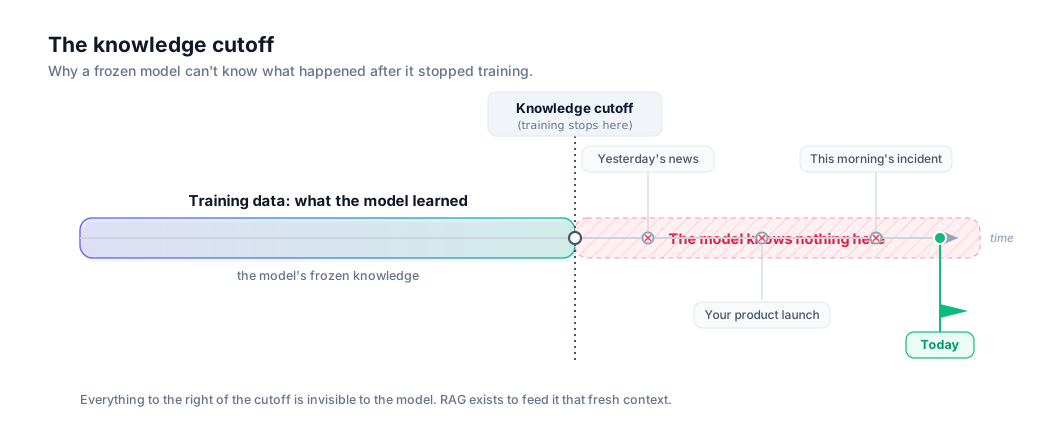
Every LLM is built from a snapshot of text collected up to a certain date. That date is its knowledge cutoff: the point where its training data ends and, as far as the model is concerned, history stops.
Ask it about anything that happened after that line (yesterday’s incident, this morning’s release, a law passed last week) and it simply has no data. It will still answer (it always answers), but it’s now extrapolating into a void. The frozen snapshot is also why a model can’t “learn” your correction mid-conversation in any lasting way: its weights were fixed at training time and the world has kept moving without it.
Here’s that gap drawn out:
3. No private or proprietary knowledge
The knowledge cutoff is about when. This one is about what. Even for events well before the cutoff, the model only ever saw public text: roughly, what was scrapeable from the open internet and licensed datasets.
It never saw your internal wiki. Not your Slack, not your design docs, not your customer database, not the PDF policy that actually governs refunds. None of that was in the training pile, so none of it is in the model. This is usually the limitation that bites businesses hardest: the single most valuable knowledge you have, your knowledge, is precisely the knowledge a general-purpose model is guaranteed not to possess. A bigger or smarter model doesn’t help here, because the issue isn’t capability; it’s that the information was never in the room.
4. Context window limits
“Fine,” you might say, “I’ll just paste our whole handbook into the prompt every time.” It’s the right instinct, and it runs straight into a wall, so let me define the two terms that explain the wall.
A token is the unit a model reads and writes in. It’s a chunk of text, very roughly ¾ of a word in English, so “refund” might be one token and “unbelievable” might be three. Models don’t see letters or words; they see sequences of tokens.
The context window is the maximum number of tokens the model can hold in mind at once: your prompt and its answer combined. Think of it as the model’s working memory, or the size of its desk. It’s finite and fixed for a given model.
So pasting “everything” fails for concrete reasons:
- It doesn’t fit, and even when it does, that isn’t the win it sounds like. Context windows have grown fast: several frontier models now hold hundreds of thousands of tokens, and a few (Gemini, GPT-4.1, Claude) reach about a million. To put that in perspective, a single ~200-page manual is roughly 150K tokens (ballpark, since token counts depend on the text), so one big document can eat a sizable chunk of even a large window on its own. But a real knowledge base, every wiki page, ticket, contract, and PDF, is easily tens of millions of tokens or more, so most of your data still physically cannot sit in one prompt. And the catch is that even for the slice that does fit, the two problems below don’t go away, which is why “just use a bigger window” isn’t the answer.
- It’s wasteful. Even when something fits, every token you send costs money and time on every single request. Shipping your entire handbook to answer one refund question is like re-reading the whole binder out loud before every sentence.
- It degrades. Bury one relevant line in a hundred thousand irrelevant ones and models get measurably worse at finding and using it; the signal drowns. This is a measured property even of long-context frontier models, not a quirk of small ones: it’s the U-shaped “lost in the middle” effect (Liu et al., 2023), where text at the start and end of a long context is used more reliably than text stranded in the middle. More context is not the same as more relevant context.
The fix isn’t a bigger desk. It’s putting only the right page on the desk at the right moment. Which is exactly what RAG does.
Enter RAG
Here’s the whole idea in one sentence:
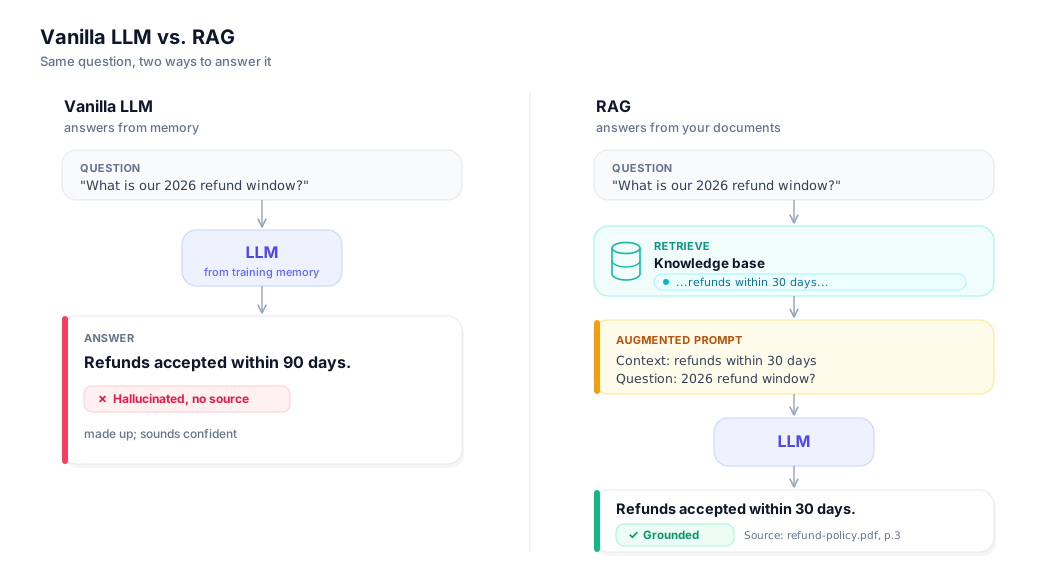
RAG fetches the most relevant pieces of your own data and places them into the model’s prompt, so the model answers from evidence you supplied instead of from memory alone.
That’s it. We’re not retraining the model, not changing its weights, not teaching it anything permanent. We’re changing what it sees at the moment it answers. The name spells out the three moves, in order:
- R is for Retrieval. Retrieval is the step that searches your knowledge for the pieces most relevant to the question and pulls them out. When you ask about refunds, retrieval finds the actual paragraph from your actual policy. This is what gives the model access to private data and to anything newer than its cutoff: you’re handing it the page, not hoping it memorized one.
- A is for Augmentation. Augmentation means augmenting the prompt: we take the retrieved pieces and place them into the prompt alongside the user’s question, usually with a quiet instruction like “answer using the context below.” We aren’t asking the model what it remembers; we’re asking it to read what we just gave it and respond to that.
- G is for Generation. Generation is the model doing what it’s genuinely great at, writing a fluent, coherent answer, except now it’s writing one grounded in the supplied evidence rather than spun from probability. Same talented writer, finally given the right source material.
Notice how cleanly the three moves answer the four problems. Retrieval supplies the private data point 3 lacked and the fresh data point 2 lacked. Augmentation puts only the relevant slice on the desk, sidestepping the context-window wall of point 4. And because the answer is now anchored to real text the model can read, and can even cite, hallucination from point 1 drops sharply: it’s much harder to invent a refund number when the correct one is sitting right there in the prompt.
This is the shift, side by side:
The mental model: an open-book exam
If you remember one image from this whole part, make it this one.
Picture two students taking the same exam.
The first sits a closed-book exam. When a question lands outside what she happens to remember, she has no way to look anything up, so she writes down her best guess in confident handwriting, because a blank answer scores zero and a plausible one might not. Sometimes she’s right. Sometimes she invents a citation that doesn’t exist. She has no way to tell those two cases apart, and neither do you from the paper alone.
The second sits the open-book version of the exact same exam. Same student, same brain, same skill, but now she’s allowed to bring the textbook. When a question lands, she flips to the relevant page, lays the book open beside her question, reads the passage, and writes the answer in her own words, grounded in what’s on the page in front of her.
The closed-book student is a vanilla LLM. The open-book student is RAG. Nothing about the student’s intelligence changed; only her access to the source did. That’s the entire intuition, and it maps one-to-one onto the mechanism:
- Flipping to the right page = retrieval (find the relevant material)
- Laying the open book beside the question = augmentation (put that material in front of the model with the question)
- Writing the answer in her own words = generation (the model composes the response from what’s there)

The analogy even predicts RAG’s failure modes, which is how you know it’s a good one. If your “textbook” doesn’t contain the answer, the open-book student is no better off: RAG can only ground answers in knowledge you actually gave it. And if she flips to the wrong page, she’ll confidently answer from irrelevant material, which is why retrieval quality is the whole ballgame, and why much of this series is about getting the right page into her hands.
A bird’s-eye view of the pipeline
So how do we let a program “flip to the right page” across thousands of documents in milliseconds? You don’t read all your documents at question time; that’s the context-window wall again. Instead you do a little preparation ahead of time so that, at question time, finding the right page is fast.
There are two phases. The first happens once, up front, whenever your documents change. The second happens every time someone asks something.
Indexing (done ahead of time):
- Document. Start with your raw source: a PDF, a wiki page, a transcript, a database row.
- Chunk. Split each document into smaller passages. A chunk is a bite-sized piece of text, a few sentences or a paragraph, small enough to be specific, big enough to stand on its own. (We chunk because we want to retrieve the relevant paragraph, not an entire 80-page manual.)
- Embed. Convert each chunk into an embedding: a list of numbers that captures the chunk’s meaning, such that passages about similar ideas end up with similar numbers. That list of numbers is called a vector, and in practice it has a few hundred to a few thousand entries (typical embedding dimensions run from 384 to 3072, ballpark, depending on the model). This is the quiet trick that lets a computer search by meaning instead of by exact keywords, and it’s important enough that it’s the entire subject of Part 2.
- Store. Save all those vectors in a vector store, a database built to answer one question blazingly fast: “which stored vectors are most similar to this one?”
Querying (done per question):
- Retrieve. Embed the user’s question into a vector too, then ask the vector store for the chunks whose vectors are closest to it. Closest-in-meaning ≈ most-relevant. These are the “right pages.”
- Augment. Drop those retrieved chunks into the prompt alongside the question, with an instruction to answer from them.
- Generate. Send that assembled prompt to the LLM, which writes the grounded answer (ideally citing which chunk it used).
That’s the entire arc: document → chunk → embed → store → retrieve → augment → generate. Don’t worry about how any single stage works yet; each one gets its own part later. For now I just want the map in your head, because the rest of the series is a guided tour of exactly these stations. The interactive figure below walks one document through all seven, one step at a time. Play it, then step through it slowly:
So when should you reach for RAG?
RAG is not the only tool, and reaching for it reflexively is its own mistake. Here’s how I decide between the three options people usually weigh.
Just use a bigger prompt (paste the relevant text in by hand) when the knowledge is tiny and known in advance: a single policy, one short doc, a fixed style guide. If you can comfortably fit the source in the prompt and you already know which source it is, you don’t need retrieval; you need copy-paste. Don’t build a pipeline to solve a one-paragraph problem.
Reach for RAG when the knowledge is large, changing, private, or you don’t know in advance which piece you’ll need. This is the sweet spot: company wikis, product docs, support histories, contracts, anything that updates often or is too big to paste. RAG shines because you can add, change, or remove a document and the system reflects it on the next question: no retraining, just re-indexing the part that changed. If your core problem is “the model doesn’t know my facts” or “my facts keep changing,” RAG is the answer.
Consider fine-tuning (actually adjusting the model’s weights on your own examples) when you need to change the model’s behavior, format, or style rather than its facts. Fine-tuning is great at “always respond in this tone / this JSON shape / this domain’s phrasing” and poor at “know this fact,” because facts baked into weights are expensive to update and still can’t be cited. A useful one-liner: fine-tuning changes how the model talks; RAG changes what it knows right now. Many serious systems use both (fine-tune the manner, RAG the matter), but if you only adopt one thing first, and your pain is wrong-about-my-data, start with RAG.
Here’s the decision in a sentence: if the failure is the model not knowing your current, specific information, RAG is the fix, and almost every “the AI made something up about our business” problem is that failure in disguise.
There’s a fourth option worth flagging now and revisiting later: sometimes you may not need RAG at all, because the knowledge is small and stable enough to just keep loaded. Part 16 takes this seriously and compares RAG against long-context prompting and cache-augmented generation (CAG), where you preload the whole source once and reuse the model’s cached state across questions.
Try it yourself
You don’t need any code to feel the whole problem (and the whole fix) in about two minutes. Open any general chatbot and ask it an org-only fact: something that lives in your handbook, your wiki, or your onboarding doc and nowhere on the public internet. “What’s our refund window?” “Who approves expense reports over $5,000?” “What’s the SLA in our standard support contract?” Watch what comes back. You’ll usually get a fluent, specific, confident answer, and it will be invented, because the model has never seen the document that holds the real one. That confident-but-groundless reply is the confabulation we opened with.
Now do retrieval by hand. Find the actual paragraph in the real document, paste it into the chat, and ask the exact same question again, this time with “answer using only the text above.” The answer should snap to what the page says. You just ran a one-shot RAG pipeline manually: you retrieved the relevant passage, augmented the prompt with it, and let the model generate from it. Everything in this series is about automating those three moves across thousands of documents so you don’t have to find and paste the right page yourself.
⚠️ Common pitfalls
- RAG is not a hallucination cure-all. It moves the model’s answer from “spun from memory” to “grounded in whatever you retrieved,” which is a real improvement, but it only shifts where the truth has to come from. Retrieve the wrong page and the model will read it faithfully and hand you a confident, well-cited, wrong answer. Garbage in, fluent garbage out. This is why retrieval quality, not the LLM, is the part you’ll spend most of the series tuning.
- More retrieved context is not always better. It’s tempting to stuff the top 20 chunks into the prompt “just in case,” but extra context costs money and latency, and it can actively hurt: the relevant passage gets diluted, and models read the middle of a long context less reliably than the ends (the “lost in the middle” effect). The goal is the right page, not the most pages.
Key takeaways
- A vanilla LLM predicts likely text; it has no built-in notion of truth, no clock, and no access to your private data, which is why it hallucinates, has a knowledge cutoff, can’t see proprietary information, and can’t simply be handed “everything” due to context-window limits.
- RAG = Retrieval + Augmentation + Generation: find the relevant pieces of your data, put them in the prompt, and let the model answer from that evidence instead of from memory alone.
- The durable mental model is the open-book exam: RAG doesn’t make the model smarter, it lets it look the answer up. Retrieval is flipping to the page, augmentation is laying it open by the question, generation is writing the answer in its own words.
- The pipeline is one arc to remember: document → chunk → embed → store → retrieve → augment → generate, split into a one-time indexing phase and a per-question querying phase.
- Retrieval quality decides everything. RAG can only ground answers in what you actually retrieve; flip to the wrong page and it’ll be confidently wrong about that page instead.
- Choose deliberately: a bigger prompt for tiny known sources, RAG for large/changing/private knowledge, fine-tuning to change style and behavior rather than facts.
References
- Lewis et al. (2020), Retrieval-Augmented Generation for Knowledge-Intensive NLP Tasks. The paper that introduced RAG and gave this series its name. arXiv:2005.11401
- Liu et al. (2023), Lost in the Middle: How Language Models Use Long Contexts. The measured U-shaped effect behind “more context is not more relevant context.” arXiv:2307.03172
Glossary
- Token: the unit of text a model reads and writes; a chunk of characters roughly ¾ of an English word. Models process sequences of tokens, not letters or whole words.
- Context window: the maximum number of tokens a model can consider at once (prompt plus answer combined). Its finite “working memory.”
- Hallucination: a false statement produced with the same fluency and confidence as a true one, because the model optimizes for plausible text, not verified fact.
- Knowledge cutoff: the date the model’s training data ends; it has no information about anything that happened afterward.
- Retrieval: searching a knowledge source for the pieces most relevant to a query and pulling them out. The “R” in RAG.
- Augmentation: inserting the retrieved pieces into the model’s prompt alongside the question, so it answers from them. The “A” in RAG.
- Generation: the model composing a fluent answer; in RAG, one grounded in the augmented context rather than memory alone. The “G” in RAG.
- Chunk: a small, self-contained passage of a document (a few sentences or a paragraph), the unit RAG retrieves.
- Embedding: a representation of a chunk’s meaning as a list of numbers, arranged so that similar meanings produce similar numbers; what lets a computer search by meaning.
- Vector: the list of numbers that an embedding produces; “embedding” is the act, “vector” is the result, and the two terms are often used interchangeably.
Next up, Part 2: Embeddings. We cracked open the word “embed” and ran past it; next we slow down and answer the question the whole pipeline rests on: how do you turn the meaning of a sentence into numbers, and why does that make search by meaning possible?